Last updated · Written and tested by The PixelArtFromPhoto team, who build and maintain this tool.
This Perler bead pattern maker turns a picture into a bead-by-bead grid. Instead of guessing colours, it picks from the actual Perler range (103 colours), Hama Midi (92) or Artkal S (199), and lists the bead code, name and count for each colour, ready for your shopping list.
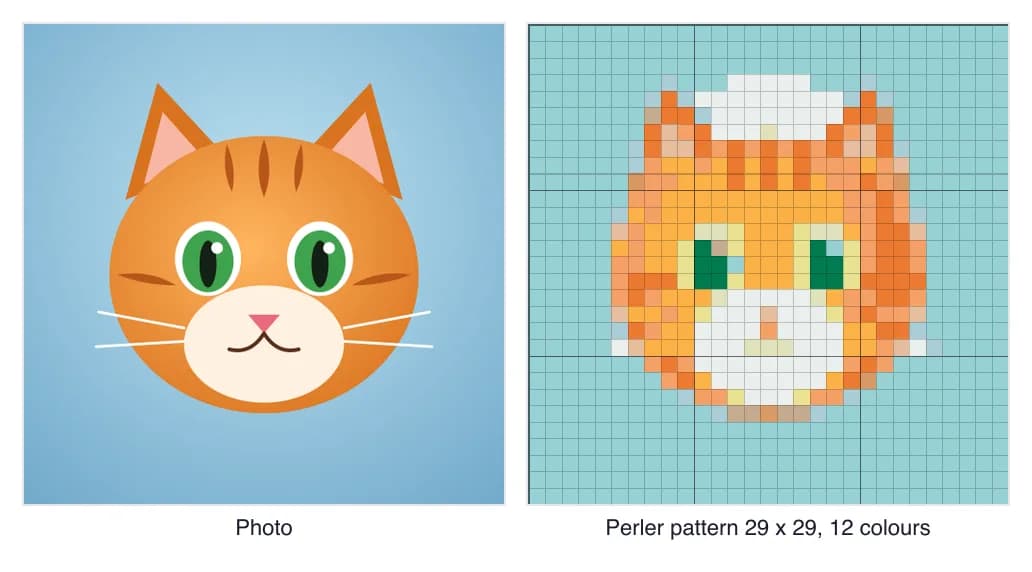
How to turn a photo into a bead pattern
- Choose a simple photo. One subject, a plain background and strong colours work best at bead size. Cartoons, logos and pets are ideal.
- Pick the size. 29 beads wide fits one large square pegboard. Go to 58 for a 2 x 2 board design with more detail.
- Pick the brand. Perler is the default; switch the palette to Hama or Artkal if those are the beads you have.
- Reduce colours. Lower Max colours until the design still reads well. Fewer colours make it cheaper and easier.
- Download the pattern sheet with a colour key, or the PDF with one page per pegboard.
Pegboards and finished size
| Pattern size | Large square pegboards | Beads | Finished size (5 mm beads) |
|---|---|---|---|
| 29 x 29 | 1 | 841 | 14.5 cm (5.7 in) |
| 58 x 58 | 4 | 3,364 | 29 cm (11.4 in) |
| 87 x 87 | 9 | 7,569 | 43.5 cm (17.1 in) |
Sizes are approximate: fused beads shrink a little, more so when ironed for longer.
Placing and ironing the beads
- Print the pegboard pages at 100% and lay them under a clear pegboard, or keep the chart beside you and work row by row.
- Place one colour at a time, starting with the largest area, so the beads you have placed are not knocked out.
- Cover with ironing paper and iron on a medium setting with gentle, even circles until the beads fuse. Let it cool, flip it and lightly iron the back.
- Put the finished piece under a heavy book while it cools to keep it flat.
Bead art is pixel art, so all the same tricks apply: try a retro palette preview in the photo to pixel art converter first, or make a stitched version with the cross stitch pattern maker.
Perler bead pattern FAQ
How do I make a Perler bead pattern from a photo?
Add the photo to the pattern maker above. It is set to Perler beads at 29 x 29, the size of one large square pegboard. Adjust the width and the number of colours, check the bead list, and download the pattern sheet or the printable PDF.
How many beads fit on a Perler pegboard?
A large square pegboard has 29 x 29 pegs, which is 841 beads. Bigger designs use several boards side by side: a 58 x 58 pattern needs 4 boards. The maker shows how many boards your pattern needs.
How big will the finished bead art be?
Midi beads (Perler, Hama Midi and Artkal S) are about 5 mm, so 29 beads is roughly 14.5 cm or 5.7 inches across. A 58 bead design is about 29 cm or 11.4 inches.
Can I use Hama or Artkal beads instead?
Yes. Choose Hama Midi beads or Artkal S beads in the Palette menu. The pattern is rebuilt with that brand's colours and codes, so you can buy exactly what the bead list says.
How many colours should a bead pattern use?
8 to 15 colours works for most photos at one-board size. Fewer colours mean fewer bags to buy and bigger areas of one colour, which are easier to fill. Keep dithering off for bead patterns.
Are the bead colours accurate?
The colours are sampled from real beads by the beadcolors project, but screens and lighting vary and Perler does not publish official colour values. Buy by the code in the bead list and treat the preview as a guide.
What does Pro add?
A printable PDF with a colour key, bead counts plus 10% spare, and one page per pegboard with symbols, so you can lay the pattern under a clear pegboard and follow it. It also removes the footer credit on the pattern sheet.