Pixel Art Palettes with Hex Codes
Last updated · Written and tested by The PixelArtFromPhoto team, who build and maintain this tool.
A ready-to-use collection of classic pixel art colour palettes, with every hex code. Click a swatch to copy one colour, copy the whole palette, or download it as a .hex file (one colour per line) or a .gpl file for Aseprite, GIMP and Krita. Every palette here is also built into our free photo to pixel art converter, so you can preview it on your own photo in one click.
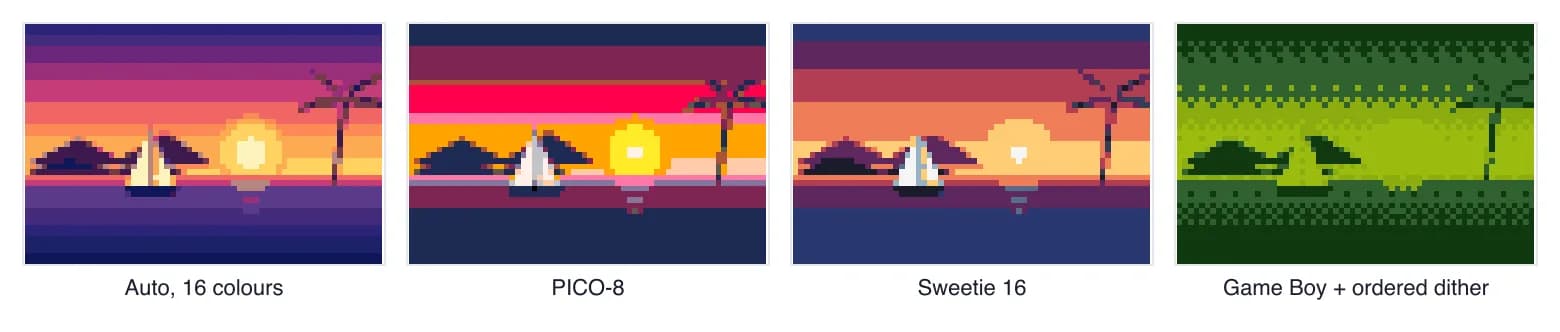
Retro and community palettes
PICO-8 (16 colours)
The fixed 16-colour palette of the PICO-8 fantasy console by Lexaloffle. Warm, saturated and instantly recognisable; great for sprites and small scenes.
Game Boy (4 colours)
Four shades of green in the style of the original 1989 Game Boy screen. Perfect for 1-bit-feeling art with a little depth; use ordered dithering for gradients.
Sweetie 16 (16 colours)
A popular 16-colour palette by GrafxKid with balanced warm and cool ramps. A safe all-rounder for landscapes and characters.
Endesga 32 (32 colours)
A 32-colour palette by Endesga, widely used in indie games. Rich skin, foliage and sky ramps for detailed pieces.
Commodore 64 (16 colours)
The 16 colours of the Commodore 64 (1982), using the widely used Pepto measurements. Muted and nostalgic.
CGA (16 colours)
The full 16-colour CGA palette of early IBM PCs. Harsh, bright and very retro; try only a few colours for an authentic DOS look.
Grayscale (8 colours)
Eight evenly spaced greys. Good for value studies and black-and-white photo pixel art.
1-bit black and white (2 colours)
Pure black and white, 1-bit. Use Atkinson or Floyd-Steinberg dithering to show shading, like early Macintosh art.
Bead, thread and block palettes
For crafts, the right palette is the one you can actually buy. These palettes use real product colours and codes, and the converter counts how many of each you need.
| Palette | Colours | Use it for |
|---|---|---|
| Perler beads | 103 | Fuse bead patterns |
| Hama Midi beads | 92 | Fuse bead patterns |
| Artkal S beads | 199 | Fuse bead patterns |
| DMC embroidery floss | 489 | Cross stitch patterns |
| Minecraft blocks | 53 | Minecraft builds |
Colour data: craft-color-codes by MakeBead (CC BY 4.0); Perler, Hama and Artkal values from maxcleme/beadcolors (MIT). Brand names are trademarks of their owners.
How to choose a palette
- Match the mood. PICO-8 and CGA feel bright and playful, Game Boy and C64 feel nostalgic, Endesga 32 suits detailed indie-game art.
- Check your ramps. A good palette has light-to-dark ramps for the colours your subject needs: skin, foliage, sky.
- Fewer is often better. Try the same image at 8 and at 16 colours; the smaller palette often looks more like real pixel art.
- Make your own. Paste any hex codes, such as your brand colours, into the Custom palette in the converter.
Want every palette in one file? Download pixel-art-palettes.json (CC BY 4.0). To cite this list, link to https://pixelartfromphoto.com/pixel-art-palettes.
Pixel art palette FAQ
What is a pixel art palette?
A palette is a fixed list of colours that every pixel in the artwork must use. Limiting colours is what gives pixel art its clean, deliberate look, and many palettes recreate the limits of real game hardware.
How many colours should a pixel art palette have?
Most pixel art uses between 4 and 32 colours. 16 is a popular sweet spot: enough for shading ramps on skin, foliage and sky, but few enough to keep the style crisp.
How do I use these palettes?
Copy the hex codes or download the .hex file and paste them into the Custom palette box of our converter, or import the .gpl file into Aseprite, GIMP or Krita. The converter also has every palette on this page built in.
Can I use these palettes in commercial games?
Colour lists are generally not protected the way artwork is, and these palettes are widely used in commercial and hobby games. Credit the palette author where you can; it is good practice in the pixel art community.
Where do the bead and thread colours come from?
Perler, Hama and Artkal colours come from the open beadcolors project (MIT), compiled with DMC floss and Minecraft block colours by craft-color-codes from MakeBead (CC BY 4.0). They are screen approximations of physical products.