Last updated · Written and tested by The PixelArtFromPhoto team, who build and maintain this tool.
To pixelate an image, the tool splits an area into square blocks and fills each block with its average colour, so detail disappears while the overall shape stays. You can pixelate the entire photo for a mosaic look, or cover only selected areas to censor a face, a number plate or a name before you post it.
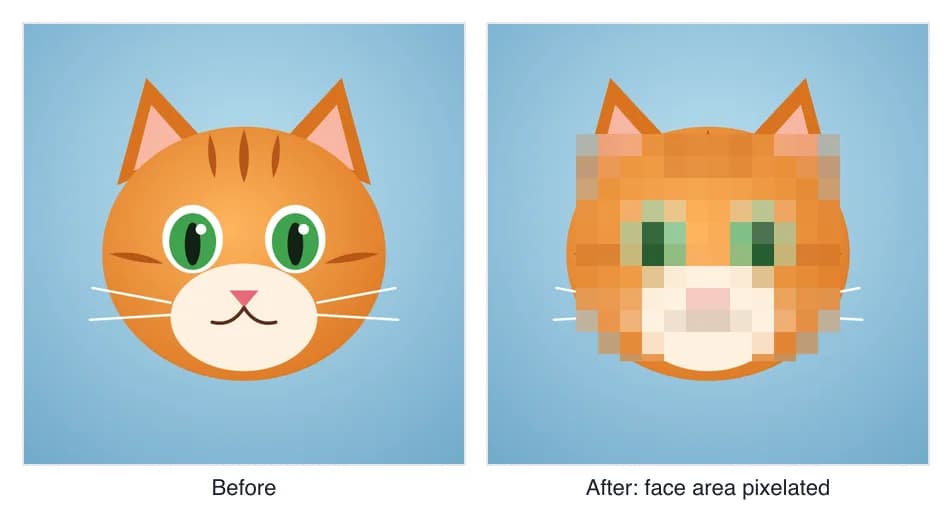
How to pixelate an image
- Open your image. Drop it on the box or choose it from your phone or computer. JPG, PNG and WebP up to 40 MB work.
- Choose what to cover. Keep Selected areas and drag over each part to hide, or click Find faces automatically. Switch to Whole image to pixelate everything.
- Pick the effect. Pixelate for the classic mosaic, Blur for a softer look, or Solid bar when the content must be unreadable.
- Set the strength. Block size is relative to each area, so 30% looks the same on a small face and a large one.
- Download. Save as PNG, JPG or WebP at full resolution, without a watermark.
Pixelate, blur or solid bar?
All three hide detail, but they are not equally safe. Pick the effect by what you are hiding.
| Effect | Looks like | Best for | Safety |
|---|---|---|---|
| Pixelate | Square mosaic blocks | Faces, plates, people in the background | Good with large blocks |
| Blur | Soft, out of focus | Backgrounds, crowds, a natural look | Good with strong blur |
| Solid bar | Flat colour box | Passwords, card and account numbers, addresses | Safest: nothing to recover |
How strong should the pixelation be?
For a face, aim for no more than about 6 to 8 blocks across it, which is roughly the 30% setting. For text, small blocks are risky: tools such as the open-source Depix project have shown that text pixelated with small blocks in a screenshot can sometimes be reconstructed. If the information matters, use the solid bar. And remember that the original photo still exists on your device, so keep it private.
Pixelate faces in group photos
Find faces automatically scans the whole photo and also overlapping tiles of it, so small faces in the back row are found too. It works best on faces looking roughly towards the camera. Always check the result before sharing: hats, sunglasses, side profiles and very small faces can be missed, and you can drag extra ovals or boxes over them in a second.
Pixelate a whole image for an 8-bit look
Switch to Whole image and raise the block size for a quick mosaic. For real pixel art, with a limited palette, dithering and outlines, use the photo to pixel art converter, which snaps every block to a proper colour palette. If you want a softer result instead, try blur image.
Privacy by design
Most online tools upload your photo to process it. This one does not: the image is decoded and edited inside your browser, and the download is created on your device. The saved file also leaves out hidden EXIF data such as the GPS location where the photo was taken.
Pixelate image FAQ
How do I pixelate part of an image?
Open the image in the tool above, keep Selected areas on, and drag a box over the part you want to hide. Add as many boxes as you need, set the block size, then click Download. Drag a box to move it, or select it and press Delete to remove it.
How do I pixelate a face automatically?
Click Find faces automatically. A face detector runs in your browser and places an oval over every face it finds, including small faces in group photos. Check the result and drag extra boxes over anything it missed, such as faces in profile.
Can pixelation be undone?
Not exactly, but small blocks can leak information. Researchers have recovered pixelated text from screenshots, and faces with fine pixelation can sometimes be recognised. Use big blocks (30% or more), and use the Solid bar effect for passwords, account numbers and anything that must stay secret.
How do I pixelate a picture on iPhone or Android?
Open this page in Safari or Chrome on your phone, tap Choose an image and pick the photo. Drag with your finger to cover an area, or switch to Whole image. The download goes to your Files or Downloads folder; from there you can save it to Photos.
Are my photos uploaded?
No. The photo is processed on a canvas inside your browser and never sent to a server. That includes face finding: the small model downloads once and runs locally.
Does pixelating remove the photo's location data?
Yes. The tool redraws the pixels into a new file, so EXIF data such as GPS location, camera model and date is not copied into the download.
Is it free? Is there a watermark?
It is free with no watermark, no signup and no daily limit, at the full resolution of your photo (up to 4096 px on the long side).